MN on a Stick
LoomLabsEvents
5.089.00 Reviews
- Version
- 1.0.24
- Installs
- 10.00K
- Age Rating
- Everyone
Screenshots
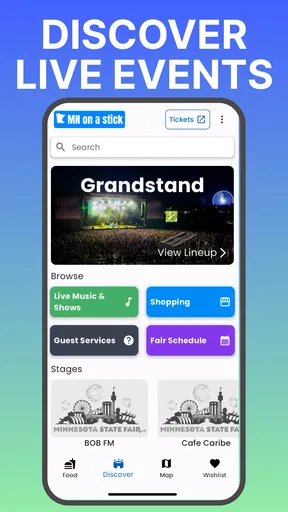
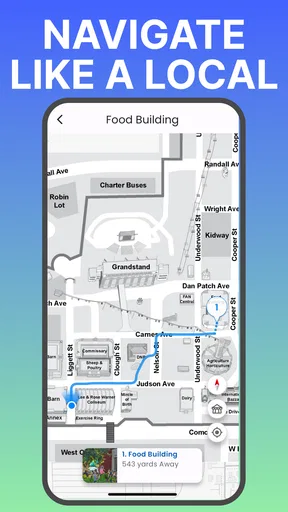
Our Review of MN on a Stick
 Analysis by Appyee
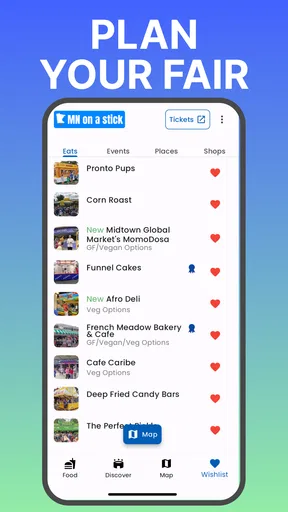
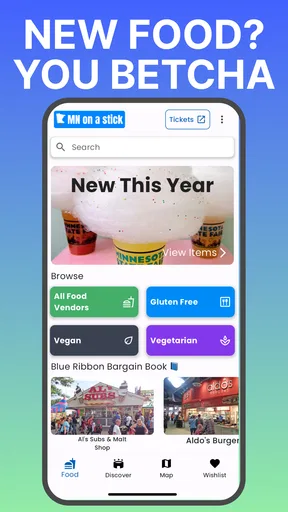
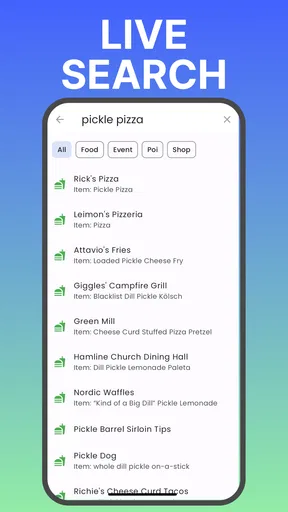
Planning a visit to the Minnesota State Fair can quickly become a group-chat exercise: people suggest food, someone asks what to see first, and another person tries to remember where everything is. MN on a Stick is built for that particular problem. I found it most useful as a focused event companion rather than a general travel app, giving the fair a clearer place on my phone before and during a visit.
The app comes from LoomLabs and sits in the Events category. It is free, rated for Everyone, and its simple purpose makes sense immediately: help people discover the MN State Fair without making them sort through unrelated information. Its store presence shows a 5.0 average from around 180 ratings, with more than 10K installs, so it has attracted a modest but enthusiastic audience. The current version is 1.0.24, and it runs on Android 7.0 or later.
From vague plans to a practical fair-day routine
When I’m planning a fair visit, I find it helps to decide what kind of day I want before I start collecting ideas: a few food stops, a family-friendly outing, or room to wander. That small choice keeps discovery useful instead of turning into an endless checklist. From there, I can look at how MN on a Stick fits into the practical rhythm of the day.
Starting with the problem I actually had
I did not open this app because I needed another place to read broad event news. I opened it because a fair visit usually begins with scattered intentions: find something memorable to eat, locate a few attractions, and avoid wasting time wandering between them. That starting condition is important, because MN on a Stick works best when I already know the kind of day I want and need help turning that idea into a workable visit.
The short name sets the tone. This is not trying to be a full city guide, a social network, or a replacement for every planning tool on my phone. It is centered on the Minnesota State Fair, which means the useful question is not “What can this app do in general?” but “Will it help me make better decisions at this fair?” For a first-time visitor, that focus is a strength. There is less temptation to drift into unrelated content.
I also liked that the app is free. A casual fair visitor may only need it for one event, so paying for a specialized planner would be difficult to justify. Free access lowers the barrier for families, visitors coming from outside Minnesota, and groups where only one person wants to handle the planning.
Turning discovery into a route
My practical workflow starts before leaving home. I use the app to browse what catches my attention, then narrow the list to a few priorities instead of treating every possible stop as mandatory. That distinction matters at a large event. A list of interesting options is useful; a list that becomes an impossible schedule is not.
Rather than trying to create a minute-by-minute itinerary, I would use MN on a Stick as a decision aid. I might identify a food stop for the middle of the day, an attraction that works for the whole group, and one flexible option for later. This leaves room for queues, conversations, weather changes, and the simple fact that a fair is more enjoyable when I am not constantly checking the clock.
A helpful habit is to separate “must see” from “nice if nearby.” Even if the app helps me discover both, the final judgment still belongs to me. I would keep the essential choices short and use the rest as a backup pool. That is one of the less obvious benefits of a focused event app: it can reduce decision fatigue, but only if I resist the urge to turn discovery into an overloaded checklist.
A realistic family scenario
Imagine arriving with two adults and children who want different things. One person wants food, another wants entertainment, and the children are already tired from the trip. Before entering, I would use the app to agree on a first destination and a couple of fallback ideas. The group then has a shared starting point instead of arguing at the gate about what to do.
After the first stop, I would reassess rather than blindly follow the original plan. If the children are hungry, food becomes the next priority. If the group is energized, an attraction can take its place. MN on a Stick is most valuable here as a shared reference on one phone: it gives the conversation a common basis, while the people in the group still make the final call.
This workflow also helps when one person becomes the unofficial organizer. That person can prepare a short list before the visit, but the others can look through the same event-focused material and suggest changes. The app does not need to manage every social detail to be useful; it only needs to make the fair’s possibilities easier to discuss.
What happens during the visit
At the fair, the app’s value shifts from discovery to quick recall. I would open it when the group has finished one activity and needs a next move. The best use is a short check rather than continuous screen time: look for an option, make a decision, put the phone away, and enjoy the event.
That approach is especially sensible for families. A phone can help coordinate people, but it can also become another distraction. I would avoid using the app as a reason to keep everyone staring at a screen while walking. Instead, one person can take responsibility for checking it, then communicate the choice aloud.
For solo visitors, the workflow is different. I can browse at my own pace and choose based on mood, which makes the focused design more appealing. I do not need to negotiate with anyone, and I can use the app to create a loose sequence without committing to a rigid schedule. Couples and small groups fall somewhere between those two cases: the app is useful when someone needs to settle a choice quickly.
Handoffs between people and tools
The app does not replace every part of a fair-day plan. A realistic handoff might begin with MN on a Stick for discovering ideas, continue with a group message to agree on priorities, and finish with the phone’s ordinary map or calendar tools for broader travel logistics. That division of labor makes sense. A specialized event app should handle the event itself, while general phone tools handle getting there, meeting up, and remembering arrangements.
I would also share the plan verbally rather than assuming everyone has installed the app. If one friend has the app and the rest do not, the organizer can use it as the source for suggestions and then send a compact summary to the group. This is more practical than expecting every member of a family to learn a new tool for one outing.
There is a subtle trade-off here. A dedicated app can be easier to browse than a general web search because it keeps attention on one event. On the other hand, a general search engine may be better when I need information outside the app’s central purpose, such as transport, accommodation, or a broader schedule comparison. I would not force MN on a Stick to answer questions it was not designed to answer.
Where it improves on usual alternatives
The usual alternative is searching the web whenever a question appears. That works, but it often produces scattered pages, advertisements, and results that are not organized around the immediate experience of attending the fair. MN on a Stick feels more direct because its identity is tied to one destination and one kind of outing.
Another alternative is relying on memory or on a printed handout. Those methods can be comfortable, especially for people who dislike phone use, but they make spontaneous discovery harder. A paper guide is also less convenient to consult while the group is already moving. The app gives me a compact digital starting point without requiring a large general-purpose travel platform.
It is also different from a full itinerary planner. A full planner is better when I need reservations, multiple destinations, transport connections, or shared schedules across a trip. For one fair visit, that extra structure may feel like work. MN on a Stick is better when the goal is to browse, choose, and adjust casually.
My main caution is that a focused event app should be treated as one layer of preparation, not the entire operating system for the day. I would still keep practical travel details elsewhere and avoid assuming that a discovery tool can solve every situation once crowds, timing, and personal needs enter the picture.
The result: less wandering, better choices
The outcome I want is not a perfectly optimized fair visit. That would remove much of the fun. The better result is arriving with enough context to make confident choices, while keeping the freedom to change direction. MN on a Stick supports that middle ground: it can help me move from “There must be something good here” to “Let’s try this first, then decide what comes next.”
For a first visit, that confidence may be the biggest gain. I can begin with a short plan instead of feeling that I need to understand the entire fair at once. For a returning visitor, the value is more selective. I can use it to refresh my memory, look for ideas beyond my usual routine, or give a visiting friend a more organized introduction.
The app is also well suited to low-pressure planning. I would not measure success by how many items I discover. I would measure it by whether the group spends less time debating and more time enjoying the fair. That is a modest goal, but it is exactly the kind of goal a specialized event companion should serve.
Where the flow breaks down
The same focus that makes the app approachable can limit it. Someone looking for a complete trip-management system may find it too narrow. If my main concern is transportation, lodging, accessibility planning across the whole journey, or coordinating several unrelated destinations, I would choose broader tools alongside it rather than depend on this app alone.
There is also a human limitation: no app can remove the unpredictability of a busy fair. A carefully chosen sequence may be interrupted by crowds, long waits, tired children, or a sudden change of plans. I would treat any suggested path as flexible and keep the group’s energy level ahead of the itinerary.
Another point is that the app’s usefulness depends on how actively I use its discoveries. Installing it at the last second and expecting it to plan the entire day for me is not the strongest workflow. I get more from it when I spend a few minutes beforehand deciding what matters, then use it lightly on site. That preparation is a small cost, but it is worth recognizing.
People who prefer entirely offline, non-digital planning may also be happier with a printed guide or a simple handwritten list. The app is not automatically better just because it is on a phone. Its advantage appears when I want quick browsing and a shared reference during an event.
Who should download it
I would recommend MN on a Stick to first-time fair visitors, families trying to agree on priorities, and anyone who wants a focused way to discover the Minnesota State Fair. It is particularly appealing if I dislike building elaborate itineraries but still want more direction than random wandering provides.
I would be more selective for experienced visitors who already have a fixed routine. If I know exactly where I want to go and do not enjoy exploring alternatives, the app may add little. Likewise, travelers needing a complete regional guide should pair it with more general planning tools instead of expecting one event app to cover every need.
For an Everyone-rated, free Events app, the approachable design direction makes sense. LoomLabs has kept the concept easy to understand: open it when I want to discover the fair, use the discoveries to start a conversation, and let the actual day remain flexible. That simplicity is more useful than a crowded feature set would be for this particular job.
My final recommendation is positive, with a clear boundary. Use MN on a Stick as the discovery and coordination layer of your fair visit, not as a replacement for every other travel tool. When I use it that way, it turns a vague outing into a manageable plan without taking away the spontaneity that makes the Minnesota State Fair worth visiting. It is a practical companion for deciding what to try next, especially when several people need to make that decision together.
Verdict
Strengths of MN on a Stick
- Simple controls make it easy to start playing immediately.
- Short sessions are ideal for quick breaks or casual play.
- The stick-themed presentation gives the game a distinctive identity.
- Lightweight gameplay should run well on many older devices.
- Progress feels rewarding as you improve your timing and accuracy.
Limitations of MN on a Stick
- The gameplay may become repetitive after extended play sessions.
- Limited variety can reduce long-term appeal for experienced players.
- Some challenges may feel frustrating when precise timing is required.
- The visual style may seem too basic for players seeking detailed graphics.
- Replay value depends heavily on personal interest in score improvement.
Similar Picks in This Category
View All
Easy Quran Mp3 Audio Offline
Muslim Worldapp4.7

Invitation Maker: Cards & RSVP
Greetings Island4.9

StubHub - Live Event Tickets
StubHub4.3

Fever: Events & Tickets
Fever Labs4.7

Epic Freebie Games Radar
Arioch Pds - Apps & Games4.4

Invitation card Maker, Design
Splendid App Maker4.9
Frequently Asked Questions
What is MN on a Stick, and what can I do with it?
MN on a Stick is a mobile application designed to provide a convenient way to access and use its core features directly from an Android or iOS device. After installing it, users can explore the available tools, adjust the main settings, and interact with the app through its touch-friendly interface. The exact experience may vary depending on the version, device, and operating system currently supported.
Is MN on a Stick free to download and use?
The app may be available as a free download, but users should check the current Google Play Store or Apple App Store listing before installing it. Some versions of mobile applications include optional purchases, advertising, subscriptions, or features that require payment. Reviewing the store description, pricing section, and in-app purchase information is the safest way to understand any possible costs before using MN on a Stick.
Which devices and operating systems support MN on a Stick?
Compatibility depends on the version of MN on a Stick published by its developer. Before downloading, check the app’s official store page for the required Android or iOS version, supported device types, and available storage. Older phones and tablets may not provide the same performance as newer models, and certain features could be limited if the operating system or device hardware is outdated.
Does MN on a Stick require an internet connection?
Whether an internet connection is necessary depends on which part of MN on a Stick you are using. Basic functions may work offline after installation, while updates, online content, account-related services, synchronization, or advertisements may require Wi-Fi or mobile data. If you plan to use the app while traveling, test its main features offline first and review its permissions and data requirements.
Is MN on a Stick safe to install and use?
Users should download MN on a Stick only from a trusted official store or a verified developer link rather than from unknown APK or third-party websites. Before installation, review the developer name, update history, ratings, privacy information, and requested permissions. Avoid granting access that seems unrelated to the app’s purpose, and keep both the application and your device operating system updated for better security.
